

Are you a fan of emulation? I know I am, and it seems one of the premiere tools for it is going to be getting a nice update soon. RetroDECK has just released a progress report on their upcoming 0.8.0b release.
For those who don’t know, RetroDECK is an all-in-one package on the Discover Store that puts all of your emulators into one download, configures them, and gets it all set up with Emulation-Station DE (or ES-DE) as the graphical front end. All files are in one place, all wrapped together with the ES-DE front end and a framework on top to help with mod management, controller profile configuring, and even installing free BIOS for emulators. And yes, this includes RetroAchievements support.
Here’s a rundown of what we can expect from this new update when it arrives.
Update to ES-DE 3.0
RetroDECK will be updating the version of EmulationStation to version 3.0. This brings with it a few changes, mostly in the front end of ES-DE, which we detailed here in our article on the 3.0 update. It does change a lot of directories, so it’s recommended NOT to update any themes you may have for ES-DE until RetroDECK is updated.
External Controller Support
This update will also add Steam Input profiles for certain Nintendo Switch, PlayStation 3-5, Xbox 360/One/Series controllers, and the Steam Controller. It also adds radial menu support for these external controllers, not just the Steam Deck controller.
External controllers are also gaining support for using the right joystick as a mouse, which will help when playing PC systems or platforms such as the Wii, which often require the use of a pointer.
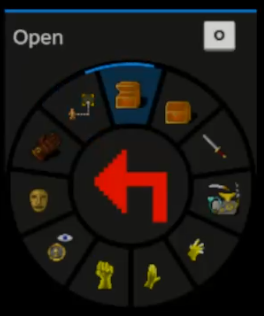
ScummVM Radial Menu
ScummVM is getting a radial menu added, which can be accessed via the Steam Deck’s left touchpad, and allows you to quickly input common ScummVM commands, such as picking up items and examining objects.
Additional Translations to the Godot Configurator (Not in 0.8.0b)
In a future update, the RetroDECK team has confirmed that the Godot Configurator will also be translated into additional languages, including English, Swedish, Japanese, Simplified Chinese, Italian, German, and Ukrainian.
New Stand-Alone Emulators
The following emulators will be added to RetroDECK in version 0.8.0b:
- Ryujinx (Switch)
- OpenBOR
- Solarus
- IkemanGO (M.U.G.E.N)
- MAME
And that’s all for this progress report! I love seeing the improvements coming, especially with the attention to detail for emulators like ScummVM to make them a bit easier to use with a gamepad. I am looking forward to the release!
If you enjoyed this article, check out the rest of the content on SteamDeckHQ! We have a wide variety of game reviews and news that are sure to help your gaming experience. Whether you’re looking for news, tips and tutorials, game settings and reviews, or just want to stay up-to-date on the latest trends, we’ve got your back.


2 comments
Ron Stoppable
“This is a little bit different than the popular EmuDeck, as this is a single download that includes everything. All files are in one place, all wrapped together with the ES-DE front end…”
You’ve just described EmuDeck. They do exactly this as well… They just give you the option of running each emulator individually, or you can use them from the ES front end
Oliver Stogden
Hi, I edited out the reference to EmuDeck.
Articles go through more than 1 person before they are posted, generally, and some of us use EmuDeck, others RetroDECK, so I think there was some confusion as to what each application does. (Spoiler: They basically do the same thing).
There are some differences between the 2 solutions, mainly being what emulators they use, and sometimes how they are pre-configured, but to the average user, they both serve the same purpose.